React doesn't re-render when 'props' change
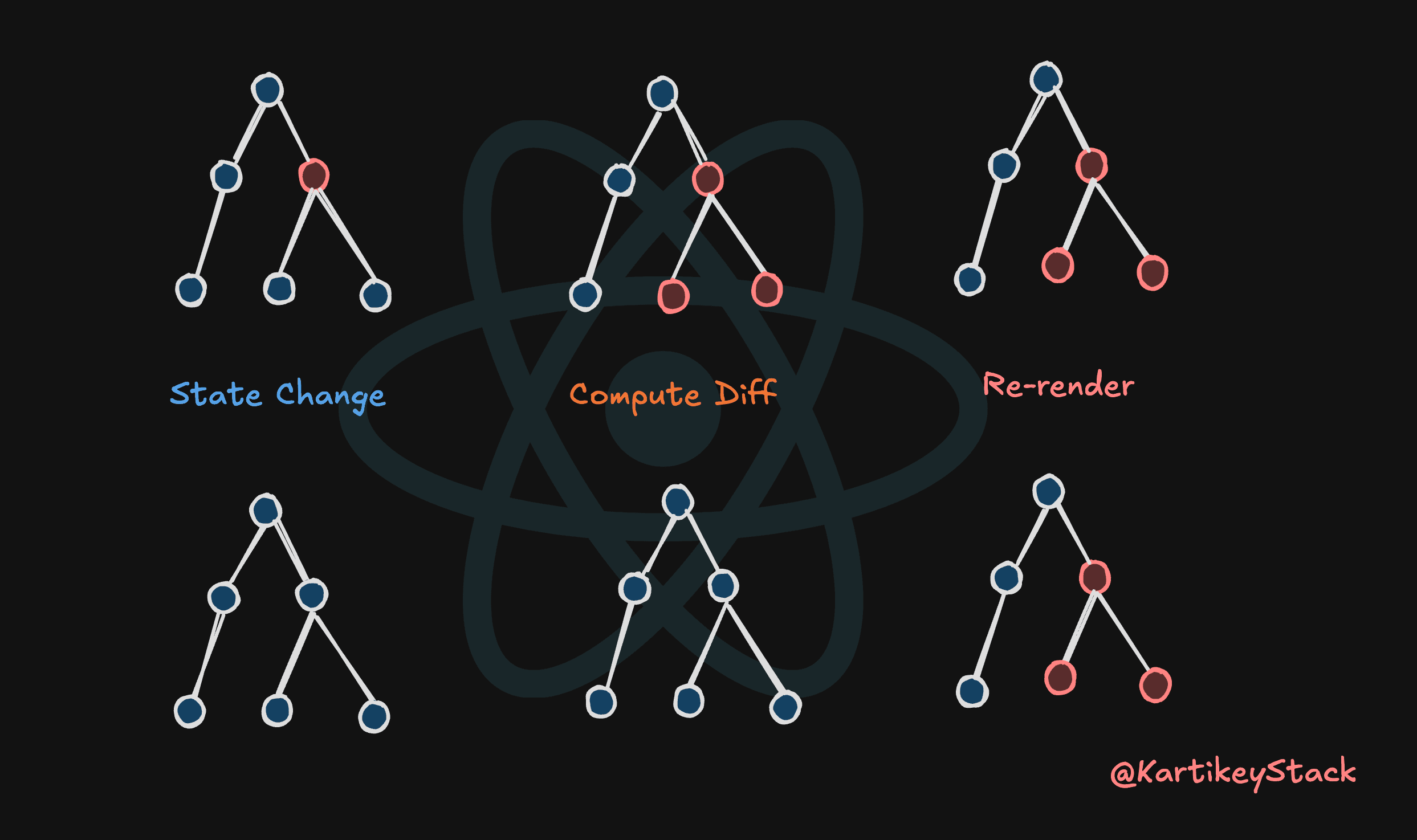
Yeah, I know. That statement sounds wrong, every React tutorial, every stack overflow answer, every senior dev explanation starts with "React re-renders when props change."
Except that's not actually how it works, and this misconception is why developers spend hours wrapping everything in React.memo, useCallback, and useMemo trying to "fix" performance issues that don't exist.
I wasted an entire weekend once optimizing a dashboard that "felt slow." Added memo everywhere, Wrapped every callback, felt like I was doing something important, but guess what… the app was still slow. Turned out the issue was an unoptimized image that was 8MB, Not re-renders… JUST AN IMAGE.
That's when I realized I didn't actually understand what was happening.
Let me show you.
The Proof
Here's a simple component:
const Child = ({ count }) => {
  console.log("Child rendered");
  return <div>Count: {count}</div>;
};

const Parent = () => {
  const [parentCount, setParentCount] = useState(0);
  const childCount = 5; // Never changes

  return (
    <>
      <button onClick={() => setParentCount((count) => count + 1)}>
        Clicked {parentCount} times
      </button>
      <Child count={childCount} />
    </>
  );
};
Go ahead, try this, click the button and check the console.
Quick note on Strict Mode
If you're running this in React Strict Mode (default in dev), you’ll see extra renders. That’s intentional, React double-invokes render logic in development to surface side-effects.
This article is about why renders happen, not how many times dev mode calls your function.
Child re-renders every single time. Even though count is literally always 5. The prop never changes.
First time I saw this, I thought I messed something up. Checked the react version, restarted the dev server, cleared cache, but nope… This is how React works.
If props changing caused re-renders, Child shouldn't re-render at all, but it does. Every time Parent renders.
Here's what actually triggers re-renders:
- Component's own state changes
- Parent component re-renders
- Context value changes
Props aren't on that list, they are inputs to a render… they don’t schedule one.
When Parent re-renders, react automatically re-renders all its children. Props have nothing to do with the trigger, they're just values that get passed down during a render that's already happening.
Here's what's actually happening under the hood
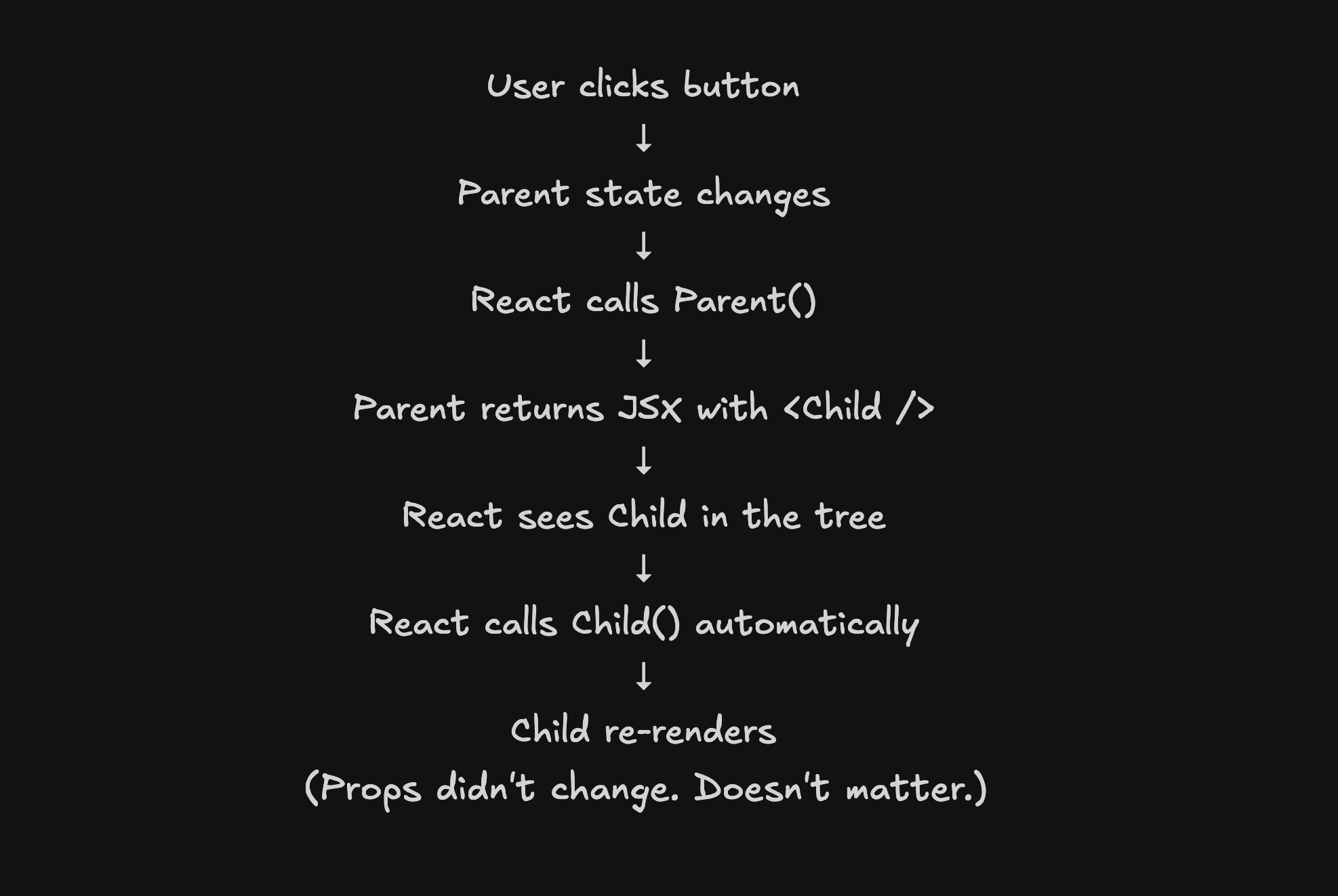
This is why adding React.memo everywhere feels like it helps, You're not preventing re-renders from prop changes. You're preventing re-renders from parent updates.
Think about what happens when you click that button:
1. Parent's state changes (parentCount updates)
2. React calls Parent() function
3. Parent returns new JSX
4. React sees <Child count={5} /> in the JSX
5. React calls Child() function and this is the re-render
6. Child returns its JSX
7. React compares old vs new output, updates DOM if needed
Steps 1-6 happen every time, Your component function runs, JSX gets created, new React elements are built.
React.memo doesn't prevent this. It just bails out early at step 5 if props haven't changed. But you're still in the render phase. The parent already re-rendered. The memo check already happened.
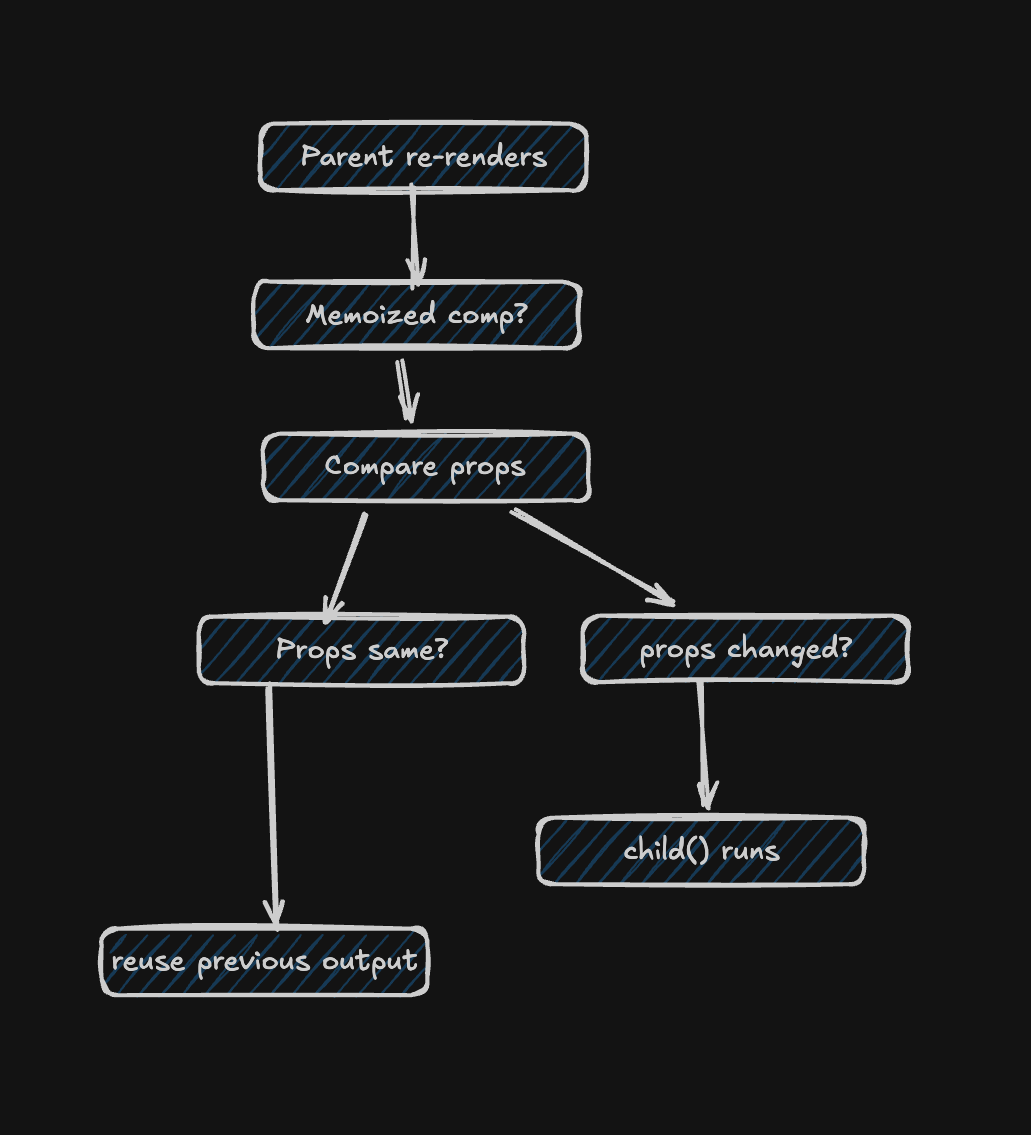
Wait, so if memo doesn't prevent re-renders, what's the point?
It prevents wasted work. If props haven't changed, React skips calling the component function and reuses the previous output. That matters for expensive components. For cheap components (most of them), the memo check itself costs more than just re-rendering.
Render ≠ Commit
A render just means React called your component function.
A commit is when React actually touches the DOM.Many renders result in zero DOM changes, and those are cheap.
The Memoization Trap
Last year I was debugging a form that felt laggy. every keystroke in the search input had this annoying delay, Not huge, but noticeable. The kind that makes you want to fix it immediately.
Component tree looked somewhat similar to this:
const ProductList = () => {
  const [search, setSearch] = useState("");
  const [products, setProducts] = useState([]);

  const filteredProducts = products.filter((p) =>
    p.name.toLowerCase().includes(search.toLowerCase())
  );

  return (
    <>
      <SearchInput value={search} onChange={setSearch} />
      {filteredProducts.map((product) => (
        <ProductCard key={product.id} product={product} />
      ))}
    </>
  );
};
The "obvious" fix? Wrap it in useMemo:
const filteredProducts = useMemo(
  () =>
    products.filter((p) => p.name.toLowerCase().includes(search.toLowerCase())),
  [products, search]
);
Then wrap ProductCard in React.memo, added useCallback for the onChange handler because some article said I should.
Deployed it, Still laggy, What the hell?
Now when I look at it, I know what I should have done. open React devtools profiler, Type in the search box, record the interaction. The .filter() call? ~0.3ms on 200 something products, re-rendering the ProductCard components? somewhat 8ms in total.
The actual bottleneck?
A useEffect that was hitting our analytics API on every keystroke.
Every single keystroke, 60+ api calls per search query.
Added a 300ms debounce, problem solved without memoization.
This happens all the time. You see slowness, assume it's re-renders, add memoization, feel productive, meanwhile the real issue is:
- API calls firing too often
- Expensive calculations that are actually expensive (not
.filter()on 100 items) - Too many DOM nodes (like 1000+ table rows)
- CSS animations triggering layout recalculation
- Images that aren't optimized or lazy loaded
React re-renders are fast. Until they're not, and when they're not, your Profiler will scream at you with 50ms+ render times.
When Memoization Actually Helps
Okay so when DO you actually need React.memo and useCallback?
When you have proof it's slow, profile first, if a component takes 50ms+ to render and re-renders frequently with unchanged props, memoize it. Otherwise you're guessing.
When you're rendering genuinely expensive stuff, a data visualization with thousands of SVG elements? A canvas animation? A huge table with hundreds of rows? Yeah, memoize that. A list of 50 product cards? Probably not worth it.
const HeavyChart = React.memo(({ dataPoints }) => {
  // This thing renders 10,000 DOM elements
  return <ComplexVisualization data={dataPoints} />;
});
Actually, I've seen people memoize components that render like 3 divs, The memo check overhead is probably more expensive than just rendering those divs. React is really fast at this stuff so until there's a need, stay away from using unnecessary memo.
This is another example when Context is involved.
const ThemeContext = createContext();

const App = () => {
  const [theme, setTheme] = useState("light");

  // Creates a new object reference every render
  const value = { theme, setTheme };

  return (
    <ThemeContext.Provider value={value}>
      <ExpensiveTree />
    </ThemeContext.Provider>
  );
};
Every component using useContext(ThemeContext) re-renders on every App render, even if theme didn't change. any guesses why? new object reference, React sees it as a different value.
Fix:
const value = useMemo(() => ({ theme, setTheme }), [theme]);When you've already memoized a component, This is where useCallback actually matters. If you memoized a child but pass it a new function every render, the memo does nothing
const MemoizedChild = React.memo(({ onClick }) => {
  // ...
});

// This breaks memoization, causing new function every render
<MemoizedChild onClick={() => handleClick()} />;

// This works
const handleClickCallback = useCallback(() => handleClick(), []);
<MemoizedChild onClick={handleClickCallback} />;
But notice, you only need useCallback because you decided to use React.memo. It's a chain, You don't need one without the other.
What Actually Works
After dealing with enough "performance issues," here's what matters…
Start simple, profile when something feels slow, Optimize based on what the profiler shows you.
That's it. But here's something more concrete that actually helps, keep state close to where it's used.
Instead of lifting everything to the top:
const Dashboard = () => {
  const [search, setSearch] = useState("");
  const [filters, setFilters] = useState({});
  const [sort, setSort] = useState("name");

  // Every state change re-renders EVERYTHING below
  return (
    <>
      <SearchBar value={search} onChange={setSearch} />
      <FilterPanel filters={filters} onChange={setFilters} />
      <SortDropdown value={sort} onChange={setSort} />
      <DataTable data={data} />
      <Summary data={data} />
      <Charts data={data} />
    </>
  );
};
Keep state local:
const Dashboard = () => {
  // Only shared state lives here
  const [data, setData] = useState([]);

  return (
    <>
      <SearchSection />
      <FilterSection />
      <SortSection />
      <DataTable data={data} />
      <Summary data={data} />
      <Charts data={data} />
    </>
  );
};

const SearchSection = () => {
  const [search, setSearch] = useState("");
  // Search changes only affect this component
  // DataTable and Summary don't even know it happened
  return <SearchBar value={search} onChange={setSearch} />;
};
When search changes, only SearchSection re-renders. Everything else is fine, no memo needed.
This is composition. React's been pushing this pattern since like, forever, and it works way better than adding optimization hooks everywhere.
The Thing That Actually Matters
Most React apps don't have re-render problems, They have architecture problems.
State lifted way too high because "it might be needed somewhere." Components that do ten different things, Expensive calculations happening in render that should be moved out, API calls on every keystroke, big sized images loading on page mount.
Fix the architecture, then profile, then optimize if you actually need to.
React is stupid fast at re-rendering components. Like, impressively fast, Your 50-component tree probably re-renders in under 10ms. That's not your bottleneck
The "props cause re-renders" mental model leads to this defensive programming where you don't trust React. You wrap everything in memo "just in case." You useCallback everything because some article said it's a best practice. Your codebase gets harder to read and you're not even sure if it's faster.
The correct mental model? You trust React to be fast, You write simple code, You measure when something actually feels slow. You optimize based on data, not fear.
That's the real difference.
Look, I'm not saying React is perfect or that you should never optimize, I'm saying most of the optimization advice out there is solving problems you don't have. Start simple, Measure, Then optimize if the profiler tells you to.
well with that set, I'm gonna leave you with a question.
How do you handle React performance? do you memo everything by default or wait until you see issues? I'd love to hear what's actually worked for you.
Also please share your valueable feedbacks about this article.